This lab is based on a routing and filtering scenario provided by Network Bulls.
Solved and Answered by: Gurprabhjeet Singh
Formatting & Presentation done using: ChatGPT
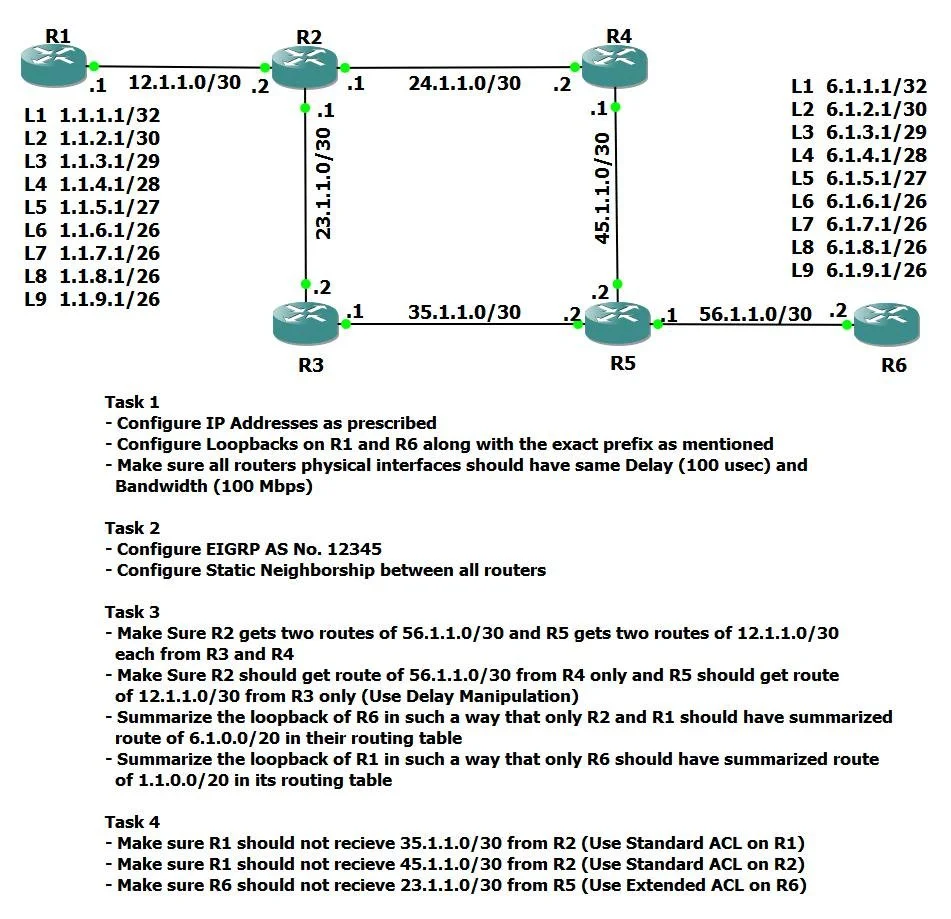
In this lab, we will configure a 6-router EIGRP topology, apply path control using delay, configure summarization, and perform route filtering using ACL + distribute-list.
Lab Tasks (Objectives)
Task 1: Configure IP addressing + Loopbacks as per topology
Task 2: Configure EIGRP 12345 with Static Neighbors
Task 3: Path Control + Summarization
R2 should learn 56.1.1.0/30 via R4 only
R5 should learn 12.1.1.0/30 via R3 only
Summarization:
Only R1 and R2 should have summary route 6.1.0.0/20
Only R6 should have summary route 1.1.0.0/20
Task 4: Filtering using ACL + distribute-list
R1 must NOT receive 35.1.1.0/30
R1 must NOT receive 45.1.1.0/30
R6 must NOT receive 23.1.1.0/30
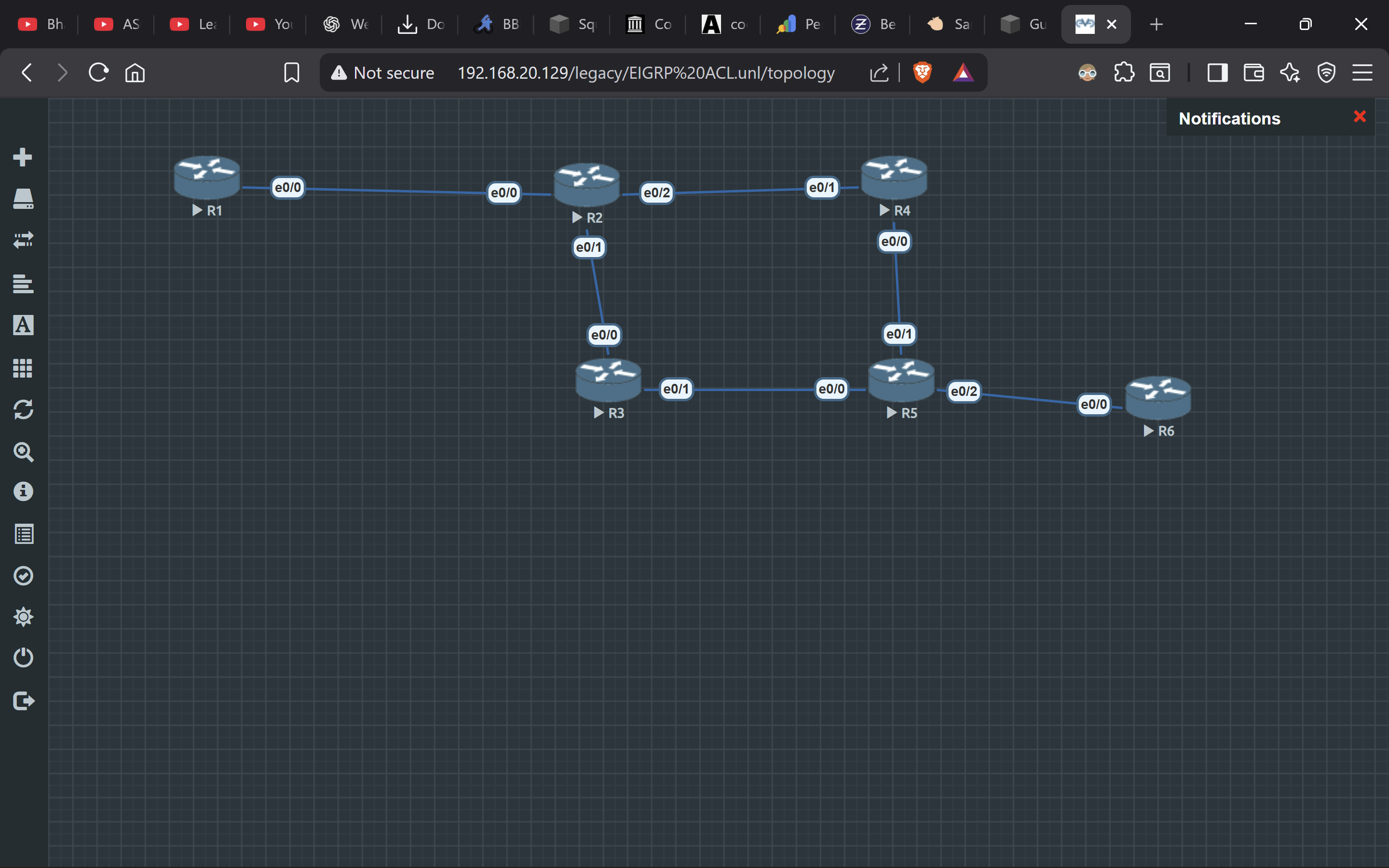
Topology Interface Mapping
R1 e0/0 ↔ R2 e0/0
R2 e0/1 ↔ R3 e0/0
R2 e0/2 ↔ R4 e0/1
R3 e0/1 ↔ R5 e0/0
R4 e0/0 ↔ R5 e0/1
R5 e0/2 ↔ R6 e0/0
IP Addressing Plan (Task 1)
Link Networks
R1–R2 Link (12.1.1.0/30)
R1 = 12.1.1.1
R2 = 12.1.1.2
R2–R3 Link (23.1.1.0/30)
R2 = 23.1.1.1
R3 = 23.1.1.2
R2–R4 Link (24.1.1.0/30)
R2 = 24.1.1.1
R4 = 24.1.1.2
R3–R5 Link (35.1.1.0/30)
R3 = 35.1.1.1
R5 = 35.1.1.2
R4–R5 Link (45.1.1.0/30)
R4 = 45.1.1.1
R5 = 45.1.1.2
R5–R6 Link (56.1.1.0/30)
R5 = 56.1.1.1
R6 = 56.1.1.2
Task 1 + Task 2: Configure R1 (IP + Loopbacks + EIGRP + Filtering)
en
conf t
hostname R1
no ip domain-lookup

interface e0/0
 ip address 12.1.1.1 255.255.255.252
 delay 100
 no shutdown

interface lo1
 ip address 1.1.1.1 255.255.255.255
interface lo2
 ip address 1.1.2.1 255.255.255.252
interface lo3
 ip address 1.1.3.1 255.255.255.248
interface lo4
 ip address 1.1.4.1 255.255.255.240
interface lo5
 ip address 1.1.5.1 255.255.255.224
interface lo6
 ip address 1.1.6.1 255.255.255.192
interface lo7
 ip address 1.1.7.1 255.255.255.192
interface lo8
 ip address 1.1.8.1 255.255.255.192
interface lo9
 ip address 1.1.9.1 255.255.255.192

access-list 10 deny 35.1.1.0 0.0.0.3
access-list 10 permit any

router eigrp 12345
 no auto-summary
 network 12.1.1.0 0.0.0.3
 network 1.1.0.0 0.0.15.255
 neighbor 12.1.1.2 e0/0
 distribute-list 10 in e0/0
end
wr
Task 1 + Task 2: Configure R2 (IP + EIGRP + Summary + Filtering + Path Control)
en
conf t
hostname R2
no ip domain-lookup

interface e0/0
 ip address 12.1.1.2 255.255.255.252
 delay 100
 no shutdown

interface e0/1
 ip address 23.1.1.1 255.255.255.252
 delay 5000
 no shutdown

interface e0/2
 ip address 24.1.1.1 255.255.255.252
 delay 100
 no shutdown

access-list 20 deny 45.1.1.0 0.0.0.3
access-list 20 permit any

router eigrp 12345
 no auto-summary
 network 12.1.1.0 0.0.0.3
 network 23.1.1.0 0.0.0.3
 network 24.1.1.0 0.0.0.3
 neighbor 12.1.1.1 e0/0
 neighbor 23.1.1.2 e0/1
 neighbor 24.1.1.2 e0/2
 distribute-list 20 out e0/0

interface e0/1
 ip summary-address eigrp 12345 1.1.0.0 255.255.240.0
end
wr
Task 1 + Task 2: Configure R3 (IP + EIGRP)
en
conf t
hostname R3
no ip domain-lookup

interface e0/0
 ip address 23.1.1.2 255.255.255.252
 delay 100
 no shutdown

interface e0/1
 ip address 35.1.1.1 255.255.255.252
 delay 100
 no shutdown

router eigrp 12345
 no auto-summary
 network 23.1.1.0 0.0.0.3
 network 35.1.1.0 0.0.0.3
 neighbor 23.1.1.1 e0/0
 neighbor 35.1.1.2 e0/1
end
wr
Task 1 + Task 2: Configure R4 (IP + EIGRP)
en
conf t
hostname R4
no ip domain-lookup

interface e0/1
 ip address 24.1.1.2 255.255.255.252
 delay 100
 no shutdown

interface e0/0
 ip address 45.1.1.1 255.255.255.252
 delay 100
 no shutdown

router eigrp 12345
 no auto-summary
 network 24.1.1.0 0.0.0.3
 network 45.1.1.0 0.0.0.3
 neighbor 24.1.1.1 e0/1
 neighbor 45.1.1.2 e0/0
end
wr
Task 1 + Task 2: Configure R5 (IP + EIGRP + Summary + Path Control)
en
conf t
hostname R5
no ip domain-lookup

interface e0/0
 ip address 35.1.1.2 255.255.255.252
 delay 100
 no shutdown

interface e0/1
 ip address 45.1.1.2 255.255.255.252
 delay 5000
 no shutdown

interface e0/2
 ip address 56.1.1.1 255.255.255.252
 delay 100
 no shutdown

router eigrp 12345
 no auto-summary
 network 35.1.1.0 0.0.0.3
 network 45.1.1.0 0.0.0.3
 network 56.1.1.0 0.0.0.3
 neighbor 35.1.1.1 e0/0
 neighbor 45.1.1.1 e0/1
 neighbor 56.1.1.2 e0/2

interface e0/1
 ip summary-address eigrp 12345 6.1.0.0 255.255.240.0
end
wr
Task 1 + Task 2: Configure R6 (IP + Loopbacks + EIGRP + Filtering)
en
conf t
hostname R6
no ip domain-lookup

interface e0/0
 ip address 56.1.1.2 255.255.255.252
 delay 100
 no shutdown

interface lo1
 ip address 6.1.1.1 255.255.255.255
interface lo2
 ip address 6.1.2.1 255.255.255.252
interface lo3
 ip address 6.1.3.1 255.255.255.248
interface lo4
 ip address 6.1.4.1 255.255.255.240
interface lo5
 ip address 6.1.5.1 255.255.255.224
interface lo6
 ip address 6.1.6.1 255.255.255.192
interface lo7
 ip address 6.1.7.1 255.255.255.192
interface lo8
 ip address 6.1.8.1 255.255.255.192
interface lo9
 ip address 6.1.9.1 255.255.255.192

access-list 30 deny 23.1.1.0 0.0.0.3
access-list 30 permit any

router eigrp 12345
 no auto-summary
 network 56.1.1.0 0.0.0.3
 network 6.1.0.0 0.0.15.255
 neighbor 56.1.1.1 e0/0
 distribute-list 30 in e0/0
end
wr
Verification Commands
Check EIGRP Neighbor adjacency
Run on all routers:
show ip eigrp neighbors
Check EIGRP learned routes
show ip route eigrp
Verify Task 3
On R2:
show ip route 56.1.1.0
Expected: Next-hop via 24.1.1.2 (R4) only.
On R5:
show ip route 12.1.1.0
Expected: Next-hop via 35.1.1.1 (R3) only.
Verify Task 4 (Filtering)
On R1:
show ip route 35.1.1.0
show ip route 45.1.1.0
Expected: % Network not in table
On R6:
show ip route 23.1.1.0
Expected: % Network not in table
Conclusion
In this lab we configured EIGRP AS 12345 with static neighbors, implemented path control using delay, configured summarization, and applied distribute-list filtering using ACLs as required.
Credits
Question Provided By: Network Bulls
Solved & Answered By: Gurprabhjeet Singh
Formatting & Presentation done using: ChatGPT